

A parking mode dashcam keeps recording after you switch off the engine, using motion, impact or time-lapse triggers to capture what happens to your vehicle while it’s unattended. It works only with a constant power source, either a hardwire kit or a dedicated battery pack, because the standard cigarette-lighter socket cuts out with the ignition. Done properly, it gives you hit-and-run evidence, vandalism footage and break-in warnings. Done badly, it leaves you with a flat battery.
TL;DR:
- Parking mode dashcams require a constant power source, either through hardwiring or a dedicated battery pack, because the cigarette-lighter socket cuts power when the engine is off.
- Impact detection (G-sensor) is ideal for hit-and-run scenarios due to its low power consumption, but it misses events that do not involve physical contact.
- Hybrid trigger setups combining time-lapse with impact detection offer broad coverage for most parking environments, especially in residential or busy areas.
- Adjusting sensitivity settings and testing for false triggers is crucial for reliable operation, especially in high-vibration or cluttered locations.
- Using insurer-approved hardware with built-in voltage-cutoff protection or dedicated power supplies ensures the dashcam’s effectiveness without risking a dead car battery.
Table of Contents
- How does parking mode dashcam recording actually work?
- Parking-mode triggers: motion, G-sensor, time-lapse and hybrid choices
- Powering parking mode: hardwiring, battery packs and voltage protection
- Recording quality, storage and camera configurations for parking mode
- Settings and false-trigger management that actually work
- Insurance and evidential value of parking-mode footage
- Buying checklist: what to check before you buy a dashcam for parking protection
- Quick setup checklist and maintenance for parking mode
- Why insurer-approved protection changes the equation
- Protect your parked vehicle with insurer-approved hardware
- Sources
- FAQ
How does parking mode dashcam recording actually work?
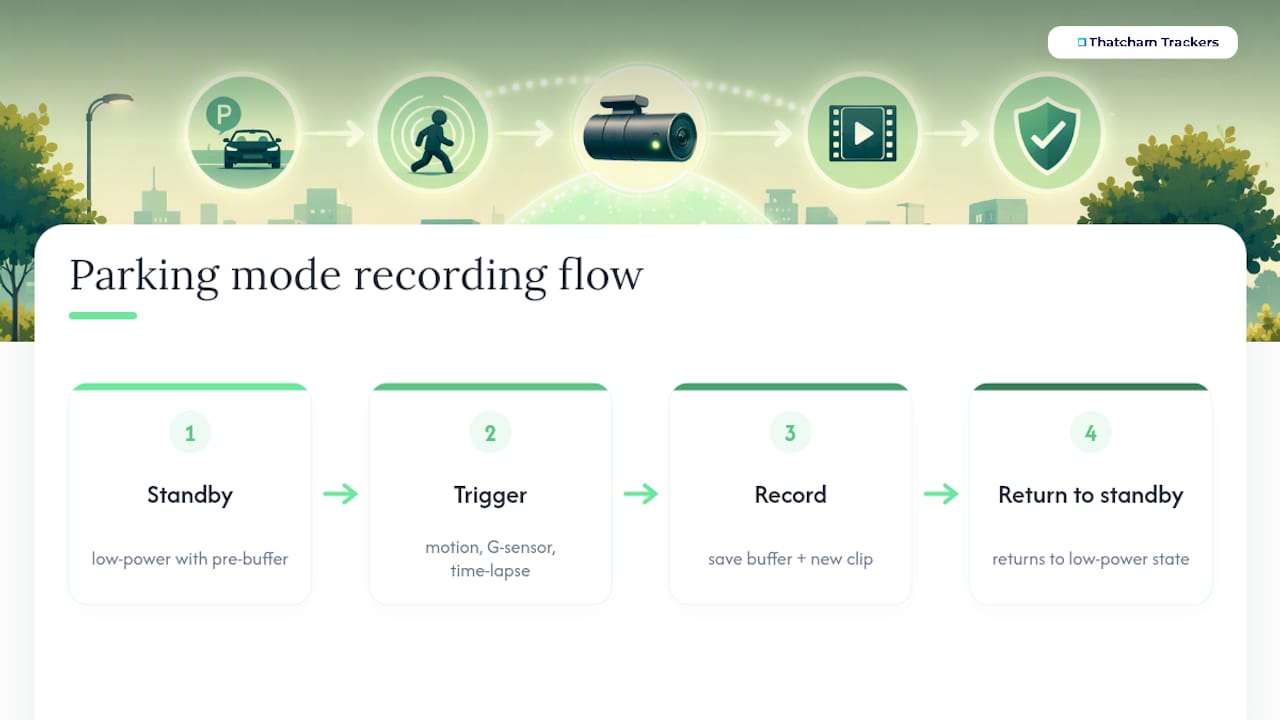
Normal dashcam recording runs continuously while the engine is on, saving footage in a rolling loop. Parking mode is different: the camera drops into a low-power standby state and only wakes up to record when something triggers it, which is what lets it run for hours or days without draining the car’s electrics into oblivion.
The clever part is pre-buffering. Rather than starting recording the instant a trigger fires, buffered pre-event recording keeps a rolling few seconds of footage in memory constantly, then saves that buffer alongside the new clip the moment something happens. That means you get the footage from before the impact or motion started, not just after, which is often the difference between catching a number plate and catching an empty frame.
Most models offer a mix of trigger types stacked together: motion detection, G-sensor impact detection and time-lapse recording, sometimes bundled with an energy-saving mode that scales back frame rate to stretch runtime further.
Parking-mode triggers: motion, G-sensor, time-lapse and hybrid choices
Which trigger suits you depends entirely on where you park.
- Motion detection catches an intruder approaching the car before contact is made, which is useful in quiet driveways. In busy car parks or on residential streets with passing traffic, it triggers constantly and can fill an SD card within a day.
- G-sensor (impact) detection only wakes the camera when it feels a knock, so it’s battery-efficient and ideal for hit-and-run scenarios. It misses anything that doesn’t physically touch the car, such as someone trying door handles or keying a panel without leaning on it.
- Time-lapse records at a reduced frame rate continuously, giving you a long visual timeline using a fraction of the storage. Detail suffers, so a fast-moving thief or a fleeing vehicle might blur past without a readable plate.
Choosing triggers by location makes a real difference: a quiet residential street rarely needs the same settings as a multi-storey car park or long-stay airport parking. A hybrid setup, running time-lapse as a baseline with G-sensor event locking on top, tends to work best for most UK drivers, giving broad coverage without abandoning reliable impact evidence.
Powering parking mode: hardwiring, battery packs and voltage protection
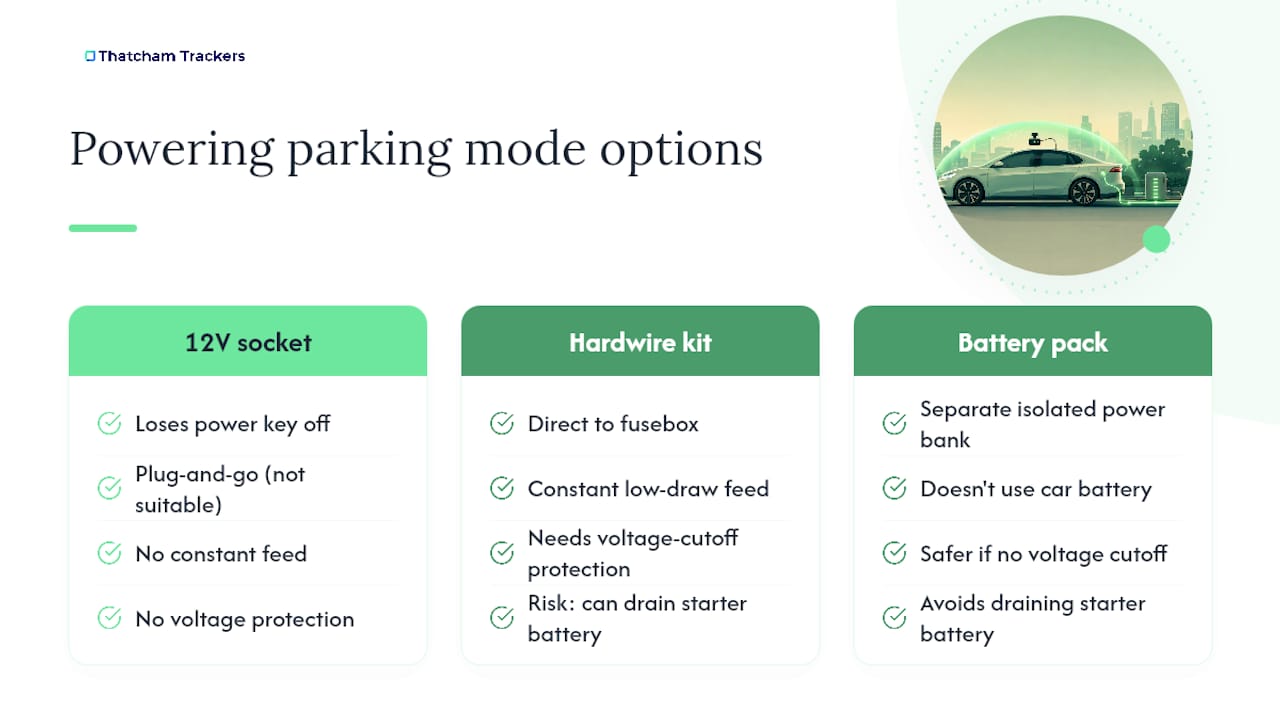
Plugging into the 12V socket won’t cut it for parking mode in most cars, because that socket loses power the second you turn the key off. The standard fix is a hardwire kit wired directly to the fusebox, giving the camera a constant, low-draw feed that survives ignition-off.
The risk with any constant feed is draining the starter battery overnight. This is where voltage-cutoff protection earns its keep: built-in power management circuitry monitors battery voltage and shuts the camera down automatically before it drops low enough to leave you stranded. If a camera lacks this circuitry, a dedicated battery pack (a separate power bank wired in isolation from the car’s own battery) is the safer route.
Fitting a hardwire kit is roughly a one-hour job for an experienced installer, though DIY is possible if you’re comfortable working around fuse panels. Professional fitting costs more upfront but avoids the classic mistakes, wrong fuse tap, poor cable routing, that cause intermittent faults months later.
Recording quality, storage and camera configurations for parking mode
Resolution matters more in parking mode than most buyers assume, because you’re often trying to read a number plate from a static, low-light angle rather than a moving daylight shot. 1080p is the workable minimum, but 4K is increasingly the standard where plate legibility genuinely matters.
Dual-channel setups covering front and rear give you coverage on both ends of the car, and pre-buffered files typically save simultaneously across both channels, so a rear shunt gets caught with the same detail as a front-end knock. On storage, loop recording overwrites older footage automatically, but locked or “event” files (anything the camera flags as an incident) get protected from deletion. A 128GB to 256GB card gives realistic breathing room; without regular housekeeping, locked files can quietly eat your entire card and stop new footage saving at all.
Settings and false-trigger management that actually work
Most nuisance clips come down to sensitivity settings left on factory defaults. Adjusting G-sensor sensitivity down in high-vibration spots, streets with speed bumps, or spaces near industrial traffic, cuts down the constant “false impact” alerts that eat storage for nothing.
- Lower G-sensor sensitivity near speed bumps, bus routes or heavy traffic, then test over a few nights before trusting the setting.
- Set ignore zones or adjust motion detection thresholds if a nearby tree, flag or passing pedestrian path keeps triggering recordings.
- Where available, AI or radar-based filtering distinguishes people and vehicles from irrelevant movement, cutting false positives considerably.
- Check SD card usage weekly at first; locked files that build up unnoticed can quietly starve the card of space for new recordings.
Pro Tip: Run your parking mode settings for a full week before relying on them. Vibration patterns from nearby roads or bins being collected on different days can reveal false triggers you wouldn’t catch in one overnight test.
Insurance and evidential value of parking-mode footage
Parking-mode footage earns its place the moment you actually need it, typically after a hit-and-run, a keying incident, or a disputed parking knock where two accounts contradict each other. Clear footage identifying a registration plate or corroborating your version of events can resolve a claim that would otherwise drag on for weeks.
Insurers generally favour footage with a visible timestamp, GPS location data and resolution sharp enough to read a plate, and some providers offer premium discounts for dashcam-equipped vehicles. When you do have usable footage, download it immediately rather than leaving it on the card, then submit copies to both your insurer and the police if a crime has occurred, since locked files can still be overwritten if the card fills before you act.
Buying checklist: what to check before you buy a dashcam for parking protection
Before handing over money, run through this list:
- Confirm parking mode is genuinely supported, not just advertised, and check which trigger types (motion, impact, time-lapse) are included.
- Check what power accessory is included or required, a hardwire kit, a battery pack, or neither, since some budget models assume you’ll sort power separately.
- Look for built-in voltage-cutoff protection or confirm smart battery pack compatibility if the camera lacks its own power management.
- Check resolution and dual-camera support, aiming for 1080p minimum and 4K where plate detail matters most.
- Ask about pre-buffer length, app or cloud connectivity, warranty terms, and whether the device has any insurer acceptance or Thatcham-related certification for tracking hardware.
Quick setup checklist and maintenance for parking mode
Getting parking mode right isn’t a one-off job. It needs a proper first setup, then regular upkeep.
- Before relying on it, confirm your trigger settings, simulate motion and a light knock to check the camera responds, and verify the voltage cutoff actually kicks in during a test.
- Format the SD card every few weeks, clear out accumulated locked files, and re-test recording after any firmware update, since updates occasionally reset custom settings.
- Call an installer if you’re unsure about fusebox wiring, and ask specifically how their hardwiring affects your factory warranty and what voltage-cutoff threshold they’ll set.
Why insurer-approved protection changes the equation
Thatcham Trackers works from the same foundation that shapes the whole vehicle security market: Thatcham Research testing and certifying devices that insurers actually recognise. That’s why our range includes Thatcham-approved S5 and S7 devices, alongside 4G dashcams offering remote live view and tracking, built around the principle that protection only counts if your insurer accepts it.
Pairing a tracker with dedicated power options rather than relying on a car’s own electrics is, in our view, the more durable route for parked-vehicle security. It avoids the single biggest failure point in DIY parking-mode setups: a flat battery from an unprotected feed.
— Thatcham Trackers
Protect your parked vehicle with insurer-approved hardware
Bolt-on dashcams and generic battery packs can go some way towards parking protection, but they rarely carry the insurer recognition that actually moves your premium. Thatcham Trackers is built around that gap: every device in our range, from the Thatcham Approved S7 through to the Thatcham Approved S5, carries the certification insurers look for, backed by nationwide mobile installation so power wiring is done properly the first time.
Our 4G dashcam with remote live view and tracking provides a way to check on your parked car from your phone rather than hoping the footage was captured at all. If you’re comparing hardware, Thatcham-approved trackers are a sensible starting point, and if power management is your main worry, ask installers directly about voltage-cutoff wiring when you book. Browse the collection and get a fitting arranged before your next long-stay park.
Sources
- Dash Cam Buyer’s Guide (2026) | SpeedCamerasUK
- Parking mode – BlackVue UK
- What is Parking Mode? – Thinkware Dash Cam UK
- Dashcam Laws and Best Practices in the UK 2026: Legal Requirements and Insurance Benefits - AutoHit
FAQ
What does parking mode do on a dash cam?
It keeps the camera active after the engine switches off, recording automatically when motion, an impact, or a time-lapse interval triggers it, so you get footage of anything that happens while the car sits unattended.
Is parking mode worth it on a dash cam?
For most drivers, yes, since it’s often the only way to capture hit-and-run damage, vandalism or a break-in attempt that happens while nobody’s around to witness it, provided the power setup is done correctly.
Does the dash cam record in parking mode?
Yes, but only if it has a constant power feed, either a hardwire kit or a dedicated battery pack, since the standard cigarette-lighter socket cuts power when the ignition is off.
How do I put a dash cam in parking mode?
Enable the setting in the camera’s menu, choose your trigger type (motion, impact or time-lapse), then connect a hardwire kit or battery pack so the camera has power once the engine is off.
Does parking mode drain the car battery?
It can if the camera lacks voltage-cutoff protection, which is why models with built-in power management, or a separate dedicated battery pack, are the safer choice for overnight parking.